
Ordo human handoff SMS opt-in
Ordo is operated by New Era Systems LLC. Registered Ordo users can choose to receive operational SMS alerts when a conversation needs human assistance, when a handoff is completed or times out, and for requested tests. This program does not send marketing messages to chat visitors.
Messages for this program are sent from +1 (380) 246-4080. Replying STOP ends alerts. Replying START afterwards allows texts from that number again but does not turn alerts back on; the user must opt in again in Settings.
The only way to give initial SMS consent is the authenticated Settings web form described below. Creating an account, accepting the general Terms of Service, or entering a mobile number during account registration does not subscribe you to SMS. This applies to the account registration form. SMS consent is a separate, optional choice after signing in. This public page documents that form for review; it does not collect phone numbers or consent.
How to opt in
- Sign in to your Ordo account and open Settings, then Security.
- Enter your own mobile number under Human handoff SMS alerts.
- Read the SMS disclosure, terms, and privacy policy. Check the optional consent box, then select Save SMS preferences.
Entering a phone number or being selected by an administrator does not give consent. The checkbox starts unchecked, and the service requires the recipient's saved consent before sending handoff alerts or test messages. Changing the phone number requires new consent. The account records the phone number, consent time, and disclosure version.
A new opt-in triggers an enrollment confirmation message with the Ordo program name, message frequency, message and data rates disclosure, and HELP and STOP instructions. If the confirmation cannot be sent, enrollment is not saved and the form asks the user to try again. Saving unchanged, active consent does not send another enrollment confirmation.
To receive an agent's handoff alerts, an administrator must also assign the user as a takeover user and select them to receive alerts for that agent. This assignment does not grant SMS consent.
Exact consent wording
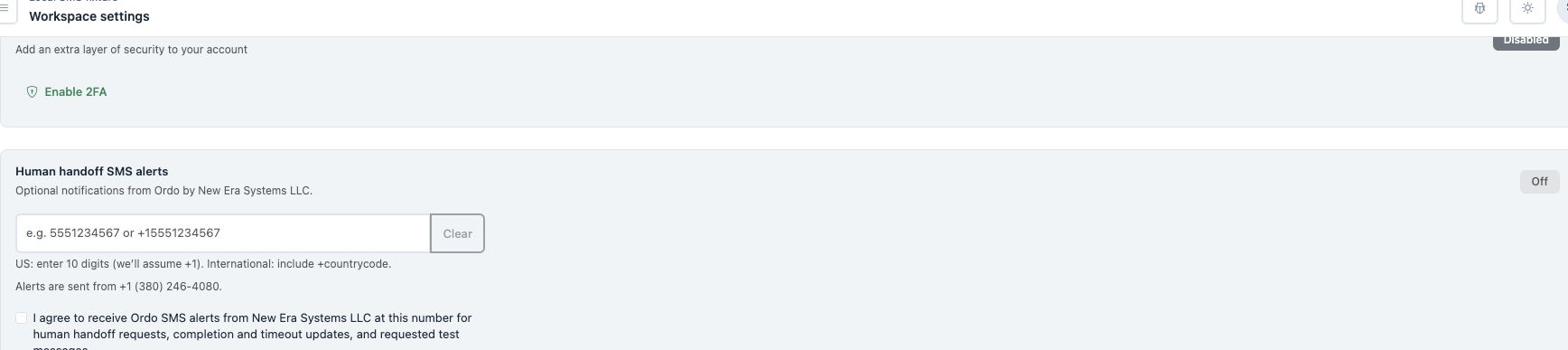
The optional, unchecked checkbox is labeled:
I agree to receive Ordo SMS alerts from New Era Systems LLC at this number for human handoff requests, completion and timeout updates, and requested test messages.
The form also displays:
Message frequency varies. Message and data rates may apply. Reply STOP to opt out or HELP for help. SMS consent is optional and is not a condition of purchase. Uncheck this box and save to stop alerts.
The form links to the SMS terms and Privacy policy beside this disclosure. These are the single Terms of Service and Privacy Policy of New Era Systems, LLC, which cover Ordo and this SMS program.
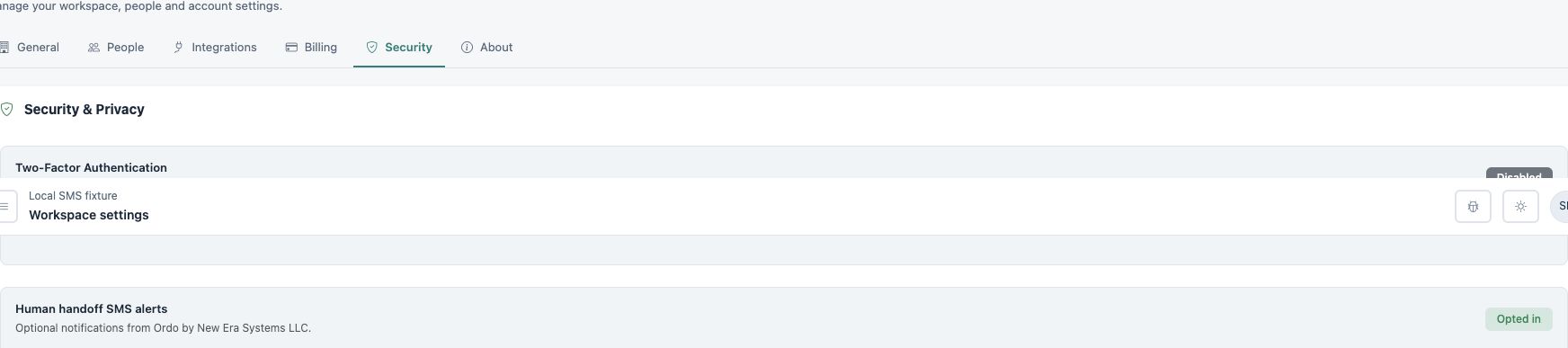
The consent screen
These screenshots show the actual account settings component in a local demonstration with a fictional account and phone number. Provider acceptance is simulated; no SMS is sent. They illustrate the form before consent and after a successful simulated save, not live enrollment or delivery. The form is behind sign-in; this page makes its consent flow available for review.
Frequency, help, and stopping messages
Message frequency varies. Message and data rates may apply. SMS consent is optional and is not a condition of purchase. Reply STOP to opt out or HELP for help. You can also uncheck the consent box and save in Settings to stop alerts. For help, email support@ordo.chat.